


If you have ever imagined sitting in a cockpit and navigating the skies, flight simulation offers a way to bring that experience into your home. Unlike traditional gaming, flight simulation focuses on realism, precision, and environmental accuracy. Every control input, visual detail, and system response is designed to replicate real-world aviation as closely as possible. This makes the experience both engaging and technically demanding.
Building a realistic flight simulation setup requires more than just installing software. You need to consider hardware, layout, and system integration to create an environment that feels authentic. From control systems to display configurations, each element contributes to how effectively you can replicate real flight conditions. Whether you are a beginner exploring aviation or an enthusiast aiming for advanced realism, understanding the structure of a proper setup is essential. This guide explains how you can design and refine a flight simulation system that delivers both immersion and performance.
What Defines a True Flight Simulation Setup
A true flight simulation setup goes beyond basic controls and visuals. It is designed to replicate the complexity of real-world aviation systems. This includes accurate control inputs, realistic flight physics, and detailed environmental modeling. When these elements work together, you experience a simulation that closely mirrors actual flying conditions.
You will notice that high-quality setups prioritize precision and consistency. Controls are designed to respond smoothly, allowing you to make subtle adjustments during flight. This level of control is essential for maintaining stability and executing maneuvers accurately.
Another defining feature is the integration of multiple components. A complete setup includes control devices, display systems, and software that work in harmony. Each part must be configured correctly to ensure seamless interaction.
By focusing on these elements, you create a system that delivers a realistic and immersive experience. This allows you to engage with flight simulation in a meaningful way, whether you are practicing basic skills or exploring advanced scenarios.
Essential Controls Every Flight Sim Enthusiast Needs
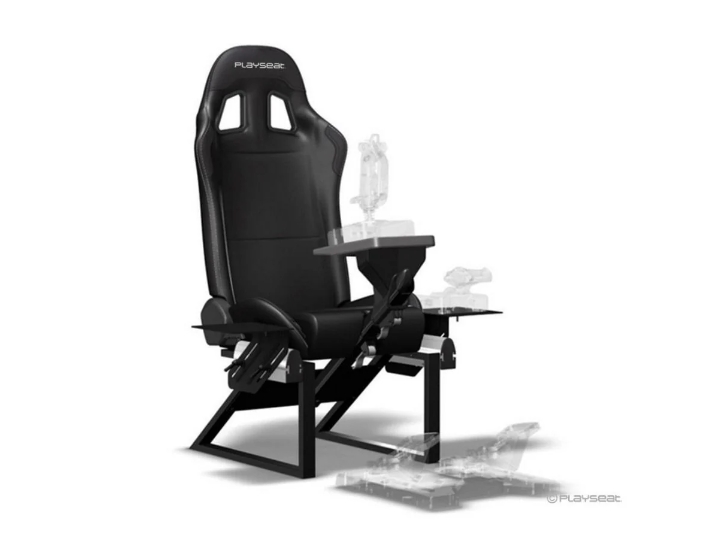
The controls you choose form the foundation of your flight simulation setup. Unlike standard gaming peripherals, flight simulation controls are designed to replicate the functions of real aircraft systems. This includes primary controls such as yokes or joysticks, as well as secondary inputs like throttle quadrants and rudder pedals. A realistic setup often begins with dedicated flight simulator cockpits, which provide the stability, ergonomic positioning, and control mounting needed for an authentic aviation experience.
A yoke or joystick allows you to control pitch and roll, which are essential for maintaining flight stability. Throttle controls manage engine power, enabling you to adjust speed and altitude. Rudder pedals provide directional control, helping you coordinate turns and maintain balance during flight.
The quality of these controls has a direct impact on your experience. High-end devices offer smoother movement and greater precision, allowing you to make accurate adjustments. This is particularly important during complex maneuvers such as takeoffs and landings.
By selecting reliable and well-designed controls, you create a setup that responds effectively to your inputs. This enhances both realism and usability, making your simulation experience more engaging and accurate.
Designing a Dedicated Flight Simulation Space
Creating a dedicated space for your flight simulator is essential for achieving consistency and immersion. You need to consider how your equipment will be arranged and how the environment will support your setup. A well-planned space allows you to focus entirely on the simulation without unnecessary distractions.
Start by evaluating the available area and determining how much room your equipment requires. Larger setups with multiple controls and displays may need a permanent installation, while smaller configurations can be more flexible. Proper spacing ensures that all components are easily accessible and comfortable to use.
When exploring advanced setups through Gamer Gear Direct, you will notice that dedicated cockpit frames, mounting systems, and modular control panels are designed to improve realism and long-term comfort. This reflects the level of precision and planning involved in modern simulation spaces.
Lighting, ventilation, and noise control are also important factors. A controlled environment improves comfort and reduces strain during extended sessions. By designing your space thoughtfully, you create a setting that enhances both performance and immersion.
Display Systems That Enhance Situational Awareness
Your display system plays a critical role in how you perceive and interact with the simulation. In flight simulation, situational awareness is essential, and your visual setup must provide clear and accurate information at all times.
Single monitor setups are suitable for beginners, offering a straightforward and space-efficient solution. However, they may limit your field of view, making it harder to track surroundings. Multi-monitor configurations expand your visual range, allowing you to see more of the cockpit and external environment. This improves awareness and realism.
Ultrawide displays provide a balance between simplicity and immersion. They offer a broader view without the complexity of multiple screens. Virtual reality systems take immersion further by placing you directly inside the cockpit, providing a 360-degree perspective.
Choosing the right display system depends on your goals and resources. By selecting a setup that enhances visibility and clarity, you improve your ability to navigate and respond to changing conditions within the simulation.
Realism Through Accessories and Add-Ons
Accessories and add-ons are what transform a basic flight simulation setup into a highly realistic environment. These components replicate additional cockpit functions and provide more control over your experience. While not always essential, they significantly enhance immersion.
Switch panels, instrument displays, and control modules allow you to interact with systems in a way that closely resembles real aircraft operation. Instead of relying on keyboard inputs, you can use physical controls to manage settings and monitor performance. This creates a more intuitive and engaging experience.
Environmental add-ons, such as cockpit frames or enclosures, further enhance realism by simulating the physical space of an aircraft. These additions help you feel more connected to the simulation.
When selecting accessories, you should consider compatibility and usability. Each component should integrate smoothly with your existing setup and contribute to the overall experience. By adding the right elements, you can create a system that feels both comprehensive and immersive.
Software Ecosystem and Simulation Platforms
The software you choose is just as important as your hardware. Flight simulation platforms vary in terms of realism, features, and system requirements. Selecting the right software ensures that your setup performs effectively and meets your expectations.
Modern simulation platforms offer highly detailed environments, accurate flight physics, and extensive customization options. These features allow you to tailor your experience to match your skill level and interests. Whether you prefer commercial aviation or smaller aircraft, there are platforms designed to suit your needs.
Add-ons and modifications further expand the capabilities of these systems. You can enhance visuals, introduce new aircraft, or simulate specific weather conditions. This flexibility allows you to create a personalized simulation environment.
Compatibility between hardware and software is essential. Ensuring that your controls and displays work seamlessly with your chosen platform prevents technical issues and improves performance. By selecting a well-supported ecosystem, you create a stable and enjoyable simulation experience.
Learning Curve: From Beginner to Advanced Pilot Skills
Flight simulation is not just about entertainment, it also involves skill development. As you begin using your setup, you will encounter a learning curve that reflects the complexity of real-world aviation. Understanding how to progress effectively helps you build confidence and improve your abilities.
At the beginner level, you focus on basic controls and simple maneuvers. This includes maintaining altitude, controlling speed, and executing smooth turns. As you become more comfortable, you can move on to advanced techniques such as navigation and instrument-based flying.
Training resources, tutorials, and community support play an important role in this process. They provide guidance and help you overcome challenges. Regular practice allows you to refine your skills and develop consistency.
By approaching flight simulation as a learning experience, you gain a deeper understanding of aviation principles. This makes the activity both rewarding and intellectually engaging.
Balancing Performance and Visual Quality
Achieving the right balance between performance and visual quality is essential for a smooth simulation experience. High-quality graphics enhance realism, but they also require significant system resources. If your hardware cannot keep up, you may experience lag or reduced responsiveness.
You need to adjust your settings based on your system’s capabilities. Lowering certain graphical features can improve performance without significantly affecting visual quality. This ensures that your simulation runs smoothly and remains responsive.
Here are some key factors to consider:
- Graphics settings optimization: Adjusting resolution, textures, and lighting can improve performance. Finding the right balance helps maintain visual clarity without overloading your system.
- Hardware capabilities: Your processor and graphics card determine how well your system handles complex simulations. Upgrading these components can significantly improve performance.
- Frame rate stability: Consistent frame rates are more important than maximum performance. Stable output ensures smoother interactions and better control.
- Background processes: Closing unnecessary applications frees up resources and improves system efficiency. This helps your simulator run more effectively.
By managing these factors, you create a setup that delivers both visual appeal and reliable performance.
Community Engagement and Online Flying Networks
One of the most rewarding aspects of flight simulation is the opportunity to connect with others. Online flying networks and communities allow you to share experiences, learn new skills, and participate in collaborative activities. These platforms add a social dimension to your simulation experience.
By joining a community, you gain access to valuable resources such as tutorials, forums, and events. These tools help you improve your skills and stay updated with the latest developments. You can also participate in group flights and challenges, which add variety and excitement.
Here are some benefits of community engagement:
- Shared knowledge and support: Experienced users provide guidance and answer questions. This helps you overcome challenges more effectively.
- Real-time multiplayer experiences: Flying with others creates a more dynamic and realistic environment. You can coordinate with other pilots and simulate real-world scenarios.
- Access to custom content: Communities often create add-ons and modifications that enhance the simulation. These resources expand your options and improve realism.
- Motivation and progression: Being part of a community encourages regular practice and skill development. This keeps you engaged and motivated.
Engaging with others enriches your experience and helps you make the most of your flight simulation setup.
Long-Term Upgrades for Aviation Enthusiasts
As you gain experience with your flight simulation setup, you may want to expand and refine your system. Long-term upgrades allow you to enhance realism and adapt to your evolving interests. Planning these upgrades carefully ensures that your investment remains valuable over time.
You can start by identifying areas that would benefit from improvement. This might include upgrading your controls for better precision or adding new displays for enhanced visibility. Each upgrade should align with your goals and contribute to the overall experience.
Future-proofing is another important consideration. Choosing components that support expansion allows you to integrate new technologies as they become available. This ensures that your setup remains relevant and adaptable.
By approaching upgrades strategically, you create a system that grows with your skills and interests. This long-term perspective helps you maintain a high level of immersion and enjoyment.
Conclusion
Creating a realistic flight simulation experience at home requires careful planning, the right equipment, and a clear understanding of how each component contributes to the overall system. By focusing on precision, compatibility, and thoughtful design, you can build a setup that closely replicates real-world aviation.
From selecting controls to optimizing performance, every step plays a role in enhancing immersion. Engaging with communities and upgrading your system over time further enriches the experience.
As technology continues to advance, flight simulation will become even more accessible and realistic. By starting with a solid foundation and improving gradually, you can enjoy a deeply engaging and rewarding simulation environment.
